Agent Systems · 21-c05
Agent control budgets
26 June 2026 · Production notes
Giving an agent autonomy is not giving it unlimited rights. The agent that works in production is the one that runs inside a budget: how many loop steps it may take, how many tools it may call, how many dollars it may spend, how long it may run. Autonomy is a bounded control problem.
- Question
- when to stop?
- Axis
- loop · tool · cost · time
- Exit
- escalation + termination
- Risk
- infinite loop + bill
Concepts in this post
- loop budget
- tool budget
- cost budget
- time budget
- escalation
- human-in-the-loop
- termination
The moment you make an agent a looping system rather than a one-shot answerer, a new question appears: when does the loop stop? Each turn the model can call another tool, take another observation, make another decision. With no limits, a bad day can end with the agent repeating the same mistake forever, or quietly running up a bill overnight.
This post treats agent autonomy as a bounded control problem. There are five budgets: loop steps, tool calls, dollar/token cost, wall-clock time, and the escalation that fires when those are exceeded. In the end they compose into a single guardrail. The diagrams loop continuously on their own to show where control currently sits.
Why a loop needs a budget
The heart of an agent is a loop: the model decides, calls a tool, reads the observation, and decides again. OpenAI's practical guide says it plainly: an agent run is a loop that continues until an exit condition is reached. That exit condition can be a final-output tool, a model response with no tool calls, an error, or simply a maximum number of turns.
That last one, the maximum turn count, is the loop budget. The ReAct paper shows this empirically: the authors capped steps at 7 for HotpotQA and 5 for FEVER, because more steps did not improve results. So "more steps" does not automatically mean "better answer." A loop budget is not only a safety brake; it is also a decision to stop wasting compute.
The counter below ticks down by one each turn. Filled cells are the remaining budget, empty cells are spent. When the budget hits zero the loop is forced to stop; the agent returns its best answer so far, or escalates.
Loop budget: what happens at the cap is a design choice
A number alone is not enough. "Max 15 turns" is easy to say; the real question is what happens if turn 15 arrives and the agent still is not done. LangChain's AgentExecutor splits this into two parameters. max_iterations defaults to 15, and the docs warn that setting it to None can lead to an infinite loop.
The interesting one is early_stopping_method. If the budget runs out before the agent ever returns AgentFinish, there are two options: force returns a "stopped because of the limit" message; generate calls the model one final time to produce an answer from the previous steps. Likewise AutoGen caps turns with max_turns and max_consecutive_auto_reply; in CrewAI, max_iter defaults to 20 and means "the maximum iterations before the agent must give its best answer."
when the budget ends, compute stops and a "limit reached" message returns
the model is called once more to produce an answer from the steps so far
So a loop budget has two halves: the number (how many turns) and the behaviour (what happens at the cap). Below, the same 8-turn budget is shown with two different cap behaviours.
Tool budget: really a risk budget
A tool budget is not just "how many tools may be called." OpenAI's guide recommends rating tools by risk: read or write, reversible or not, what permissions they need, whether they have financial impact. Because a data-read call and a payment-refund call are not the same thing. You can let the first run freely; the second needs an approval gate.
So it is more accurate to think of a tool budget as a traffic light. Low-risk (green) tools pass automatically. Medium-risk (yellow) tools run inside a limit or a rate (like CrewAI's max_rpm). High-risk (red) tools, irreversible actions like payments, cancellations, large refunds, are wired straight to a human approval. LangGraph's docs show that approval logic can live directly inside the tool function.
read data · search
write file · draft email
payment · cancel · refund
Below, each tool call passes through a different gate depending on its risk class. The colours show the risk class; the gate shows what that class does.
Cost budget: dollars as a first-class metric
The cost budget is the easiest one to ignore, because the bill usually arrives at the end of the month. Kapoor et al.'s "AI Agents That Matter" is written against exactly that: agent evaluations must control cost, because repeated model calls and retries can buy accuracy, which creates an incentive to build needlessly expensive systems.
The paper gives a concrete example: SWE-Agent capped each run at USD 4, which corresponds to hundreds of thousands of tokens. More strikingly, it shows that cost can differ by nearly two orders of magnitude between systems of substantially similar accuracy. So the authors argue cost should be a first-class metric, with accuracy and cost drawn on a Pareto frontier. Total cost is fixed optimization costs plus the variable per-run token cost; in high-volume applications the variable cost dominates.
every tool call produces input/output tokens; variable cost adds up fast
The bar below shows accumulating cost against a ceiling. Each tool call fills the bar; as it nears the ceiling the colour turns to a warning and the agent is stopped.
Time budget: wall-clock is a resource too
Even if an agent gives the right answer, it is useless in production if it gives it too late. So wall-clock time is a budget too. LangChain's max_execution_time bounds the total time spent in the loop; the runtime checks both the iteration count and the elapsed time and stops when either limit is reached. CrewAI also exposes max_execution_time as a timeout in seconds.
ARC's realistic-autonomous-tasks report adds an important point: practical control is not only static code limits. A task run ends when the agent says it is done, or when it becomes clear it will not finish (for example, when it is stuck in a repetitive loop). So a time budget works together with loop detection, not just a timeout.
if a repetitive loop is detected, it can stop before the timeout too
The gauge below tracks two things at once: elapsed time (the sweeping needle) and the agent's progress. When the needle enters the red zone, the timeout fires.
Escalation: handing off to a human is a protocol
What happens when a budget is exceeded? Sometimes the agent simply stops. But in high-risk or uncertain cases the right move is to hand control to a human. OpenAI's guide names two triggers: crossing failure thresholds (retry/action limits) and high-risk, sensitive, irreversible actions (payments, cancellations, large refunds).
The key point here is that escalation is not just a notification. LangGraph's interrupt mechanism shows this well: an interrupt pauses graph execution at a chosen point and waits for external input; LangGraph persists state (a checkpoint) so the run can resume later from where it stopped. So escalation is a durable pause/resume protocol. The docs add an important caveat: on resume the node runs again from the start, so side effects before the interrupt must be idempotent (the same result if re-run).
agent running
interrupt · state freezes
human approval
approved · resume
state is written to a checkpoint, so resume stays coherent
Below, the agent loop runs until it reaches a high-risk action, then state freezes, a human reviews, and on approval the loop resumes. The marker shows who currently holds control.
Termination: stopping is a set of conditions
All these budgets really serve one question: when should the agent stop? Termination is essential in complex autonomous workflows. AutoGen sums it up well: an agent stops when the work is done, when resources are consumed, or when the system needs to change strategy (for example, user intervention).
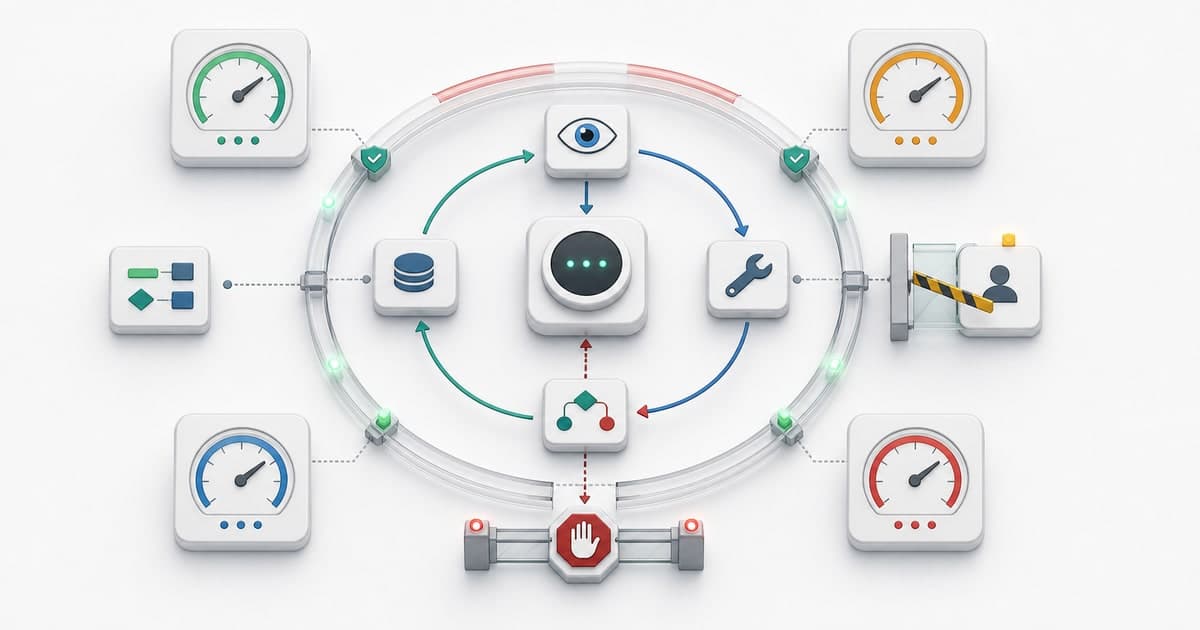
In practice, termination is not a single door but a set of conditions. Happy ending: the agent finished the task (AgentFinish, is_termination_msg). Budget end: one of the turn, tool, dollar, or time budgets ran out. Safety stop: a repetitive loop was detected or an error threshold was crossed. Handoff: a high-risk action was escalated to a human. Whichever condition fires first ends the loop there.
task done
AgentFinish · success
budget spent
turn · tool · dollar · time
safety stop
loop / error threshold
handoff
escalation · awaits approval
The diagram below shows all the exit gates around the agent loop in one frame. The green gate is success, the grey gates are budget exhaustion, the red gate is a safety stop, the blue gate is a handoff to a human.
Sources
A good agent is a system that knows within what limits to use the freedom it is given. A production-ready guardrail comes not from a single budget but from the composition of several axes: turns, tools, retries, wall-clock, rate, dollars, and human approval.
loop
how many turns
tool
how many calls / risk
cost
dollar / token ceiling
time
wall-clock
escalation
handoff to a human
whichever fills first stops the loop
So when designing an agent, ask not "what can it do?" but "where should it stop, and who takes over?" Budgets do not cripple an agent's autonomy; they make that autonomy safe to use.
- S1OpenAI, A practical guide to building agents, 2025
- S2Yao et al., ReAct, ICLR 2023 (arXiv:2210.03629)
- S3Kapoor et al., AI Agents That Matter, 2024 (arXiv:2407.01502)
- S4Kinniment et al., Evaluating LM Agents on Realistic Autonomous Tasks, ARC 2023
- S5LangChain, AgentExecutor API reference
- S6LangGraph, Interrupts
- S7Microsoft AutoGen, Terminating Conversations Between Agents
- S8CrewAI, Agents