Kubernetes · GPU Scheduling
2 May 2026 · Production notes
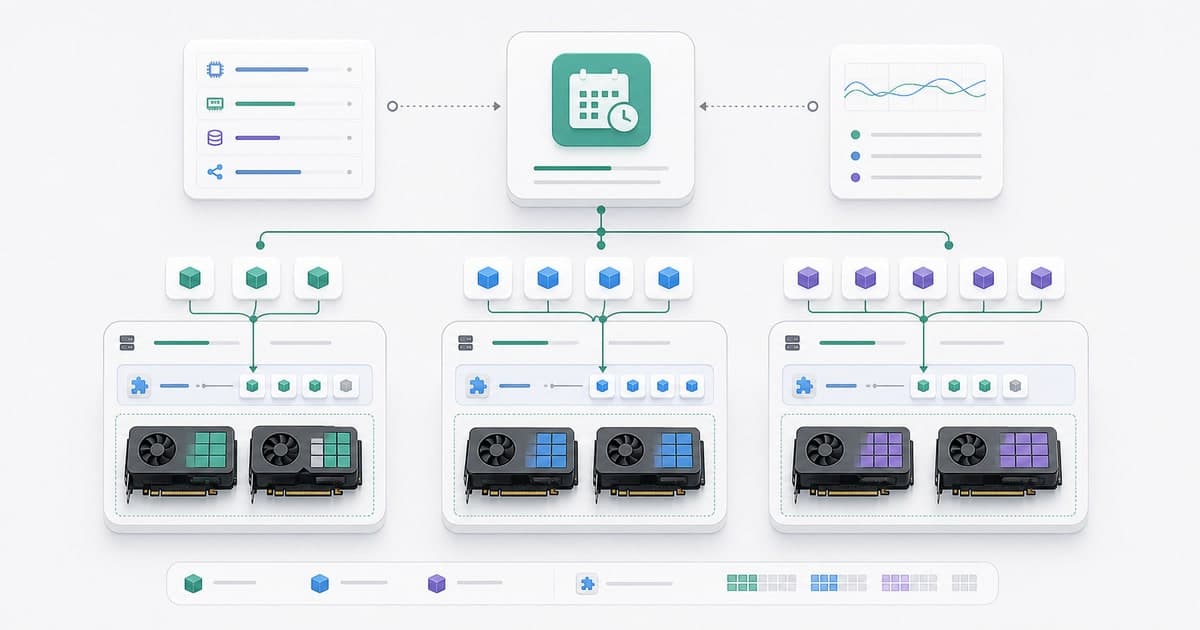
Kubernetes slices CPU and memory smoothly; but when it comes to GPUs, the default scheduler is fairly naive. A GPU either belongs entirely to a pod or it doesn't. Lowering your GPU bill in production starts with getting past that coarse granularity. The way through is not buying more cards; it's giving the scheduler the right hints.
- Default
- all or nothing
- Levers
- MIG · time-slicing
- Placement
- taint · affinity
- Result
- 18% → 71% util
Concepts in this post
- device plugin
- MIG
- time-slicing
- taints & tolerations
- node affinity
- NVLink topology
- bin-packing
A GPU is expensive, but the truly expensive one is the idle GPU. A tiny inference service grabs a whole A100 and sits at 12% utilization for months. Kubernetes' default behaviour doesn't even see that waste, because in its eyes a GPU is an indivisible whole.
Below I drew the problem and the four levers that actually work, in order: how the scheduler sees a GPU, the two ways to split a card (MIG and time-slicing), placing work on the right node (taint/affinity), and finally topology. The animations that genuinely explain something carry a gentle ↻ replay button in the corner.
The problem: all or nothing
The device-plugin model exposes a GPU as an indivisible resource: a pod either asks for a whole card or none. A small inference service might use maybe 8 GB of an 80 GB A100 and a sliver of its compute units (SMs), yet it reserves the entire card. Everything else sits idle 'just in case.'
Memory · 80 GB
Compute · 108 SM
Because several small jobs can't share one card, growing the cluster looks like the only option. It isn't. The fix is to split the same card safely and place work intelligently.
How the scheduler sees a GPU
GPUs are advertised to Kubernetes through a device plugin. The plugin counts the cards on the node and reports to the kubelet; the kubelet records it as node capacity; the API server keeps it as allocatable; and the scheduler finds a node with as many whole units as the pod requests, then binds the pod there.
The node's 8 physical GPUs flow up this chain to become its 'allocatable' count: 8.
The resource is a whole integer: a pod takes 1, 2, … whole GPUs; never 0.3.
The catch: this resource is an integer. There is no half a GPU; the scheduler can't hand out '0.3 GPU'. Splitting a card means either changing what that integer means (MIG) or sharing one unit across several pods over time (time-slicing).
Partition in hardware with MIG
On A100/H100, Multi-Instance GPU (MIG) carves the card into hardware-isolated slices. Each slice has its own compute partitions, its own memory slice and its own memory bandwidth. One A100 can be split into up to seven independent instances; the most common profile is 1g.5gb (1/7 of compute, 5 GB of memory).
MIG off
1 card = 1 pod
MIG on · 7× 1g.5gb
1 card = 7 isolated instances, all at once
each slice ≈ 1/7 of the card: ~14 SM compute + 5 GB memory
What matters is isolation: slices can't affect each other's performance, there are no 'noisy neighbours,' latency stays predictable. Each slice appears to Kubernetes as a separate resource, so the scheduler can place seven different pods on a single card, and they all run at once. MIG splits space.
Time-slicing: sharing time
For bursty, intermittent jobs that don't need isolation, there's a cheaper path: time-slicing. One GPU is shared by several pods, but in time rather than space: the card runs the jobs in turn, in small quanta. As the cursor moves along the time axis below, you can see that at any instant only one job is on the GPU.
The cost: there's no real isolation. If one job abuses the card it slows the others down, and every switch costs a small context switch. Great for bursts, risky for latency-sensitive production traffic. MIG splits space, time-slicing splits time.
“GPU efficiency on Kubernetes is a scheduling problem. Giving the scheduler the right hints is far cheaper than buying hardware.”
MIG or time-slicing?
Both open one card to many jobs, but they promise different things. The decision comes down to one question: can these jobs trust each other?
Putting work on the right node
You've split the card; but how does a pod reach the right machine? Two mechanisms work together. A taint hangs a 'no entry' sign on an expensive GPU node; only pods that tolerate it (carry a toleration) may land there. node affinity pulls the pod toward GPU-labelled nodes.
By matching taints with tolerations, the scheduler puts each pod on the right node:
tolerates the taint, affinity pulls → enters
can't tolerate the taint → blocked, lands here
So taint is a push, affinity is a pull. The result: the GPU pod (with toleration + affinity) settles onto the GPU node; the CPU pod, lacking a toleration, can't enter and lands on the CPU node. That keeps stray CPU work off expensive cards.
Topology: NVLink or PCIe?
For multi-GPU jobs, how the cards connect to each other decides throughput. NVLink-connected cards talk extremely fast; talking over PCIe is far slower. A training job's per-step all-reduce flows over exactly this link.
NVLink island A
NVLink island B
all-reduce flies over NVLink
NVLink island A
NVLink island B
PCIe bottleneck
That's why topology-aware scheduling matters: you co-locate multi-GPU jobs on NVLink-connected cards (the same island). Below, the same four-GPU job is placed two ways: in the right one the data flies within one island over NVLink; in the wrong one it splits across islands and is condemned to PCIe.
Wrapping up
Split the card, put the work on the right node, respect the topology. All three moves are configuration, not code, and together they multiply your capacity without ordering a single new GPU.